| Restocking Fee | No |
|---|---|
| Return shipping will be paid by | Seller |
| All returns accepted | Returns Accepted |
| Item must be returned within | 30 Days |
| Refund will be given as | Money back or replacement (buyer's choice) |
| Compatible Brand | For Apple |
| Memory Card(s) Supported | Memory Stick |
| Brand | Unbranded |
| Type | Card Adapter |
| Connectivity | USB-C |
| Compatible Model | For Apple iPhone 15 |
| MPN | Does Not Apply |
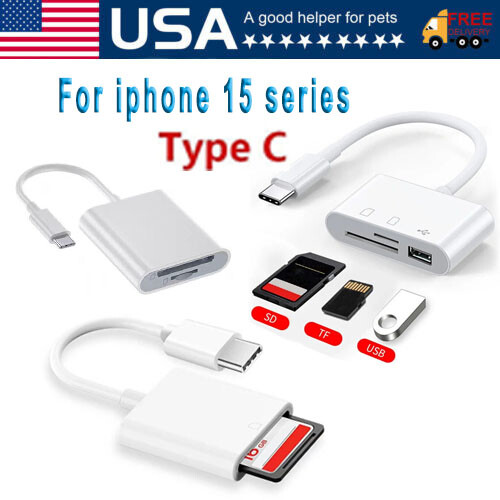
Check the listing for details. For Apple iPhone 15 Pro Max Plus USB Stick SD TF Card Reader Type C OTG Adapter. Condition: New. Listed at 4.75 USD. For Apple iPhone 15 Pro Max Plus USB Stick SD TF Card Reader Type C OTG Adapter Note: Due to the monitor's brightness/contrast settings etc. There could be some differences in the picture's colour tone and the actual item. Description 💙 HOW TO USE: Connect the Type-c to SD TF Card Camera Reader to iPhone15/iPad, open the Photos app, which lets you choose photos and videos to import, then organizes them into albums. for Type-c13+, is the two-way transmitter. You can transfer pictures, video, MP3 files, MP4 files, Excel, Word, PPT, PDF on Files App. 💙 PLUG AND PLAY: Easy to use, when you are traveling outdoors, you can share the camera pictures to the iPad and iPhone 15 without using a computer, fast and stable connection(wait for 5-10 seconds). With the SD and TF Memory Card Camera Reader, you can transfer photos & videos from your high-resolution digital camera to your iPhone and iPad directly. You can also share the human scenery along the way with your family or friends anytime, anywhere, and share the unforgettable moments you encounter. 💙 CAPACITY AND FORMAT SUPPORT: The type to SD TF Memory Card Camera Reader support standard photo formats (including JPER and RAW) and SD / HD video formats (including H.264 and MPEG-4), Supports the memory card with a maximum capacity of 512GB. With USB 2.0 speed, 14MB/S - 16MB/S. 💙 COMPATIBLE DEVICE: This adapter compatible with multiple devices, such as iPhone 15 Pro Max/15 Pro15 (under the folder: DCIM. The Type-c 13 and later models can read 4K video.) Support Type-c 9.2- Type-c14 and before - No APP Needed. type-c to SD Transfer photos and video from SD Cards • Compatible with iPhone and iPadUsage: Insert an SD card into the reader • Connect the reader to your device • Use the photos appCompatible with standard SD and SDHC cards • Micro SD card are supported when used with an adapter (not included)In order to be recognized, photos may need to be stored in a folder called DCIM in the root of the SD card with 8 character filenames, such as IMG_0001.JPG and MVI_0002.MOVOperating Voltage: 3.3V • Operating current: [Additional Settings] and toggle to enable the [OTG connection]. Transfer files using OTG 1. Enable OTG Connection on your OPPO phone through the path provided above. If the OTG connection is grayed out, the OTG connection is already enabled. 2. Insert a compatible OTG drive on your OPPO phone. After inserting the OTG, insert the USB flash drive on the OTG drive and allow the *permissions that appear on your screen. 3. Tap [OTG]. You will see all the folders from your USB flash drive and then tap the file you wish to transfer. 4. Tap and hold the file and tap [Copy] or [Move]. Then select a folder where you want to move the file. 5. Tap [Phone storage] or to a folder where you want to move it, then tap a folder under it and tap [Move to here]. If you have an SD card inserted into your phone, you may move the file to a folder on your SD card and tap [Move to here]. Note: * You need to allow permissions for the first time inserting the OTG drive. Package Includes: 1x OTG (With Packaging) Feedback:1) Your Feedback is really important to us,please take a few seconds to leave great feedback if you are satisfied with our product or service, thank you so much!2) We always offer the lowest price for best goods and service to you. 3) Please contact us before leaving neutral(3 stars) or negative(1-2 stars) feedback.We will try our best to solve the problem and leave you a happy shopping mood here. Thank you!
You may also like