| Restocking Fee | No |
|---|---|
| Return shipping will be paid by | Buyer |
| All returns accepted | Returns Accepted |
| Item must be returned within | 30 Days |
| Refund will be given as | Money Back |
| Brand | lunyee |
| MPN | Does not apply |
| Country/Region of Manufacture | China |
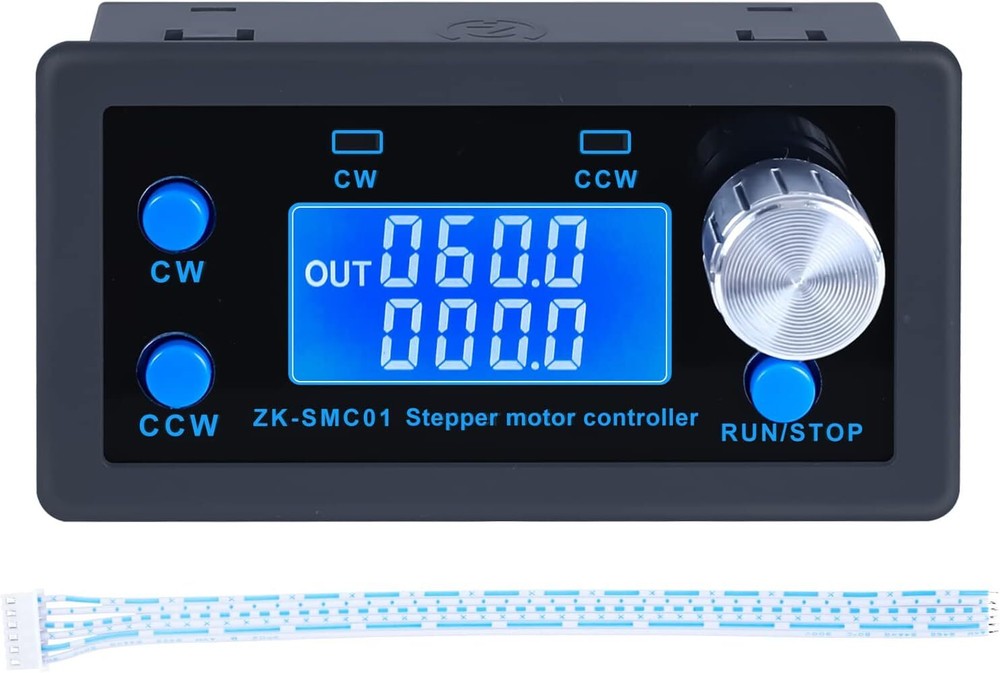
Check the listing for details. For Nema17/23 Motor Speed Adjustable Stepper Motor Controller Module DC5-30V. Condition: New. Listed at 16.59 USD. VARIOUS FUNCTIONS: The stepper motor controller can adjust the angle, speed, direction and delay time of the motor. The micro stepping resolution can reach 1/128, enabling you to control the motor more accurately. 9 OPERATING STATES: The stepping motor controller has 9 built-in fixed working modes, including forward rotation, reverse rotation, delay, cycle, etc., so you can select the working mode more quickly. In addition to the built-in parameter working mode, you can also control through external buttons or other drives. HD LCD DISPLAY: This stepper motor controller has a HD LCD display, so you can read the parameters very easily and set various parameters more precisely. The module also has a power failure memory function to prevent your parameters from being lost. FORWARD AND REVERSE ROTATION: The stepper motor controller can change the direction of motor rotation by pressing a button, and you can also select two modes, automatic or manual, by selecting the working mode, which is more widely used. 13 KINDS OF MENU SETTING FUNCTIONS: The stepper motor controller including cycle number, motor turns, delay time, number of pulses, forward speed, flip speed, etc. The external buttons and knob encoder make it very easy to set the parameters. 1. On the operation interface, rotate the encoder to adjust the speed, CW key -- forward rotation, CCW key -- reverse rotation, RUN/STOP key -- operation stop exit. 2. Press and hold the encoder to enter the menu setting. 1. On the menu setting interface, rotate the encoder to adjust and change the parameter codes F-01~F-13. 2. Long press the encoder, save the parameters and exit to enter the operation interface. 1. On the menu setting interface, briefly press the encoder to enter the parameter setting state of F-XX corresponding menu, the parameter flashes, and then briefly press Shift to rotate the encoder to adjust the parameter. 2. Press the RUN/STOP key briefly to exit the parameter setting and return to the number adjustment interface of the main menu. Power supply range DC 5-30V Main functions of the system automatic, manual, setting, serial port control Speed range 0.1-999 laps/min Number of positive pulses 1- 9,99,999 pulses Number of reversed pulses 1- 9,99,999 pulses Number of cycles 1-9999 times Forward/Reverse delay time 0.1-999 seconds Subdivision selection range 1-128 subdivision
You may also like


