| Restocking Fee | No |
|---|---|
| Return shipping will be paid by | Buyer |
| All returns accepted | Returns Accepted |
| Item must be returned within | 30 Days |
| Refund will be given as | Money Back |
| Type | PoE Tester |
| Brand | Unbranded |
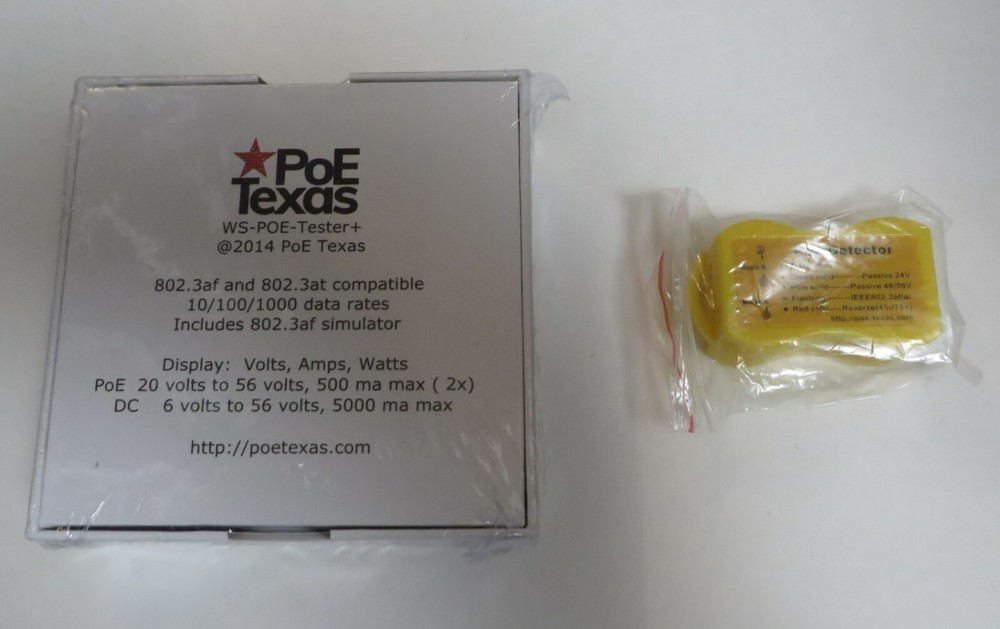
Check the listing for details. Gigabit inline PoE tester and detector (WS POE Tester+). Condition: New. Listed at 53.99 USD. !!! A vital addition to the tool kit of any IT professional !!! - Measure any type of Power Over Ethernet (PoE) on active lines without interrupting the data - Quickly find out what type of POE you have - Measure the power consumption of an unknown device - Measure the power consumption and performance of any DC power supply - Use the 802.3af switch to "turn on" any port on an IEEE 802.3af switch HOW TO USE Connect the PoE tester Source side (Top) to your switch, injector, or power supply. • RJ-45 Ports If the tester does not power up immediately and you see a yellow LED light, move between the 568A or 568B inputs to see which polarity works for you - see Polarity section. • 2.1 x 5.5mm input/output for PSU testing Use the included 2.1mm jumper cable Connect the Load side (Bottom) to your PoE enabled device or powered device for the DC port. *See IEEE 802.3af FUNCTIONS for details on the switch READING THE DISPLAY There are 4 Display Functions: - Display A - shows the status of pins 1,2 and 3,6 (Mode A) - Display B - shows the status of pins 4,5 and 7,8 (Mode B) - Display A also shows the status from the 2.1mm DC plug In to DC plug Out - Display B and A can operate at the same time with different supplies in full isolation. A PoE switch or injector may provide power on all 4 pairs of the Ethernet cable, in which case both displays will activate. The power will be the sum of the two displayed values. *For more details on Modes, see Modes section Every 3 seconds the display cycles to a different parameter. U indicates Volts; A, Amps; P, Watts. The display range is up to 280 watts with a 56 volt, 5 amp supply. See specifications for more details. IEEE 802.3af FUNCTIONS 802.3af Pass-Thru Mode - Set the 802.3af switch to OFF. If the source is an 802.3af or 802.3at switch, then there will be no indication until a compatible load device is connected. Once an 802.3af or 802.3at device is connected, the display will start to show Volts, Amps, Watts. 802.3af Simulate Mode - Set the 802.3af switch to ON. If the source is an 802.3af switch, then the display will be active even without a load. Once any load is connected, the display will start to show Volts, Amps, Watts. The switch adds a 30014w load to the power reading so you should turn it off once an actual load is applied. DC POWER FUNCTION DC connector - A power supply can be tested with this device. Connect the 2.1mm Source connector to the PoE tester, the voltage will be displayed. Connect the load side to the device to be powered with the 2.1 mm jumper included. The results will be displayed on the Mode A display. * it is possible to use the DC connector and Mode B at the same time. USB voltage Tester - please see our 5v USB inline tester for 5 volt USB applications. Specifications: Data compatibility: - 10/100 and gigabit data rates - Data passes without modification thru the tester Works with midspan or endspan PSE's 2 independent Volt and Ammeters for all PoE methods. For measuring 802.3af, 802.3at, passive, and DC power supplies Voltage Range - 1% accuracy - Mode A - 20 to 56 volts - Mode B - 20 to 56 volts - DC connector - 6 to 56volts Amps measured - Mode A and Mode B - 0 to 500 ma 2% accuracy above 5 ma - DC connector - 0 to 5 amps 2% accuracy above 50 ma Fuse protection The R345 inputs are protected by a self-resetting 500ma fuse on each of the Mode A and Mode B power pairs (12/36 and 45/78) Battery Free operation The Tester requires just 4 ma for operation, taking power from the PoE source Dimensions: 70*70*25 mm (4*4*2 inch.) Operating Humidity: 5% to 90% Operating Temperature Range: -10 ℃ - +60 ℃ PoE Method: Passive PoE Standard: 802.3af/at Power Input: 2.1mm DC Weight: 147 g (5 oz.) Item Case Number: 2
You may also like