| Return shipping will be paid by | Seller |
|---|---|
| Returns Accepted | Returns Accepted |
| Item must be returned within | 30 Days |
| Refund will be given as | Money Back |
| Modified Item | Yes |
| Country/Region of Manufacture | China |
| Programming | Automotive locksmith only! |
| Features | Remote Start |
| Color | Black |
| Manufacturer Part Number | for Mercedes W221 W216 CL65 ML GL W176 W246 W205 W |
| Modification Description | for all original cars with ORIGINAL PUSH TO START |
| Brand | KEYECU |
| Warranty | 6 Month |
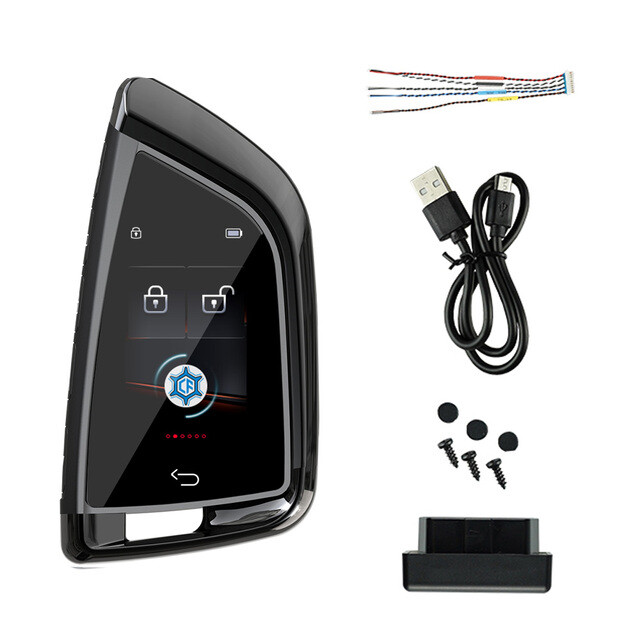
Check the listing for details. Modified Smart Remote LCD Screen Key for BMW original start/stop engine Models. Color: Black, Condition: New. Listed at 59.42 USD. PACKAGE CONTENETS: LCD KEY,DATE LINE, Instruction manual and OBD part The original car key's board needs to be installed in the LCD key cover; a professional locksmith needs to weld the original key remote control board. LCD key functions: unlock, lock, switch the tail box; Does not support mobile APP key, no comfortable entry function; Suitable for all original cars with one-key start function, not suitable for all manual direct-plug car keys. Please confirm whether you have a key start function before purchasing. It is best to send a picture of your original key to confirm. Thank you for your inquiry. Installation:Step 1:Take out the PCB board from the original key, and make sure the functions of each button.Step 2:Use our wire harness,and solder the wire to each button relevant to the functions of the original PCB board,each two wires are related to certain functions.Remarks : some original car key have four buttons,then solder the wire we marked in yellow color as multifunction for the fourth button.(please solder the two wires onthe two sides of each swith inopposite angles)Step 3lnsert the original car key PCB in to the lC socket.Notice: The red color wire will be in the right side.Step 4:Connect the antenna wire with the OBD, and insertthe OBD into the OBD port under the steering wheel.Introduction of Display menu:1.Slide this icon"Slide To Unlock" to top to unlock the key.2.This icon on left top shows theconnection status with the OBD device in the car.This icon shows the status of battery.3: lntroduction of all functions1.Press the related icons forcertain function2.Pressfor 10 seconds to select car logo.3.Slide right or left to go other functions.4:Introduction of Comfort access1.Press the icon "Turn On" to on loff the comfort access function.2.Select the "Lock ony" then the door will not be auto unlock when the key near to the car, but will be auto lock when the key away from the car.5.lntroduction of Auto Window1.The car with auto window and long press to lift up the window, when use this function will auto lock the window2.Tap tosetting on/off the auto window function6.Introduction of the user phone1.Clickto input the user phone number.In case you lose your key anyone will call to return it.7.Introduction of the device setting1.Clickto device setting.2.Click "Date Time" to setting Date time.3.Click "version Info" to go version infoclick Date to select the BMW/other.click the Bind to bind the OBD with the key.4.Click "Singnal" to adjust the remote distance for the smart key.(This setting only work when the smart key connecting with the OBD)
You may also like


