| Restocking Fee | No |
|---|---|
| Return shipping will be paid by | Buyer |
| All returns accepted | Returns Accepted |
| Item must be returned within | 14 Days |
| Refund will be given as | Money Back |
| Brand | PARALLAX |
| Model | USB TO 232 |
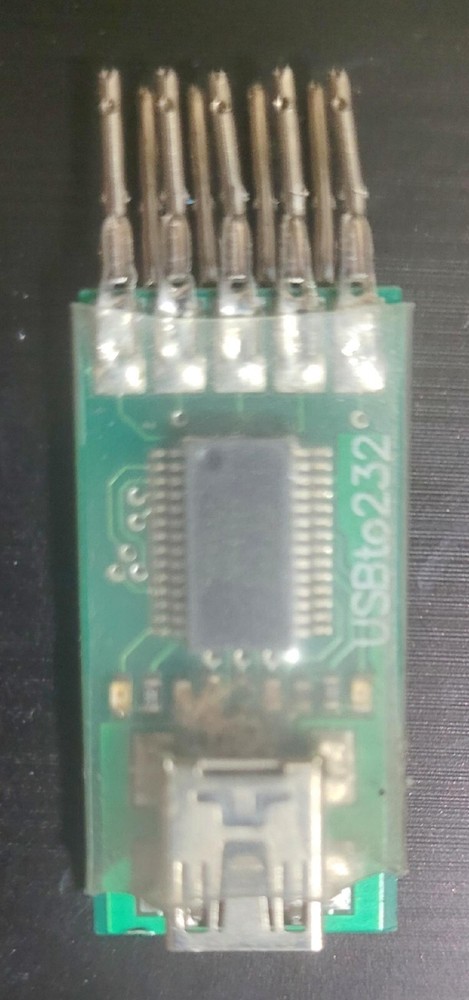
Check the listing for details. PARALLAX HUMAN INTERFACE DEVICE RS-232 INPUT TO USB ANDROID FORKLIFT CHARGER. Condition: Used. Listed at 19.99 USD. PARALLAX HUMAN INTERFACE DEVICE RS-232 INPUT TO USB/ ANDROID REMOVED FROM A FORKLIFT CHARGER The Parallax USB to Serial (RS-232) adapter provides a Virtual Com Port for devices that have a DB9 (9-pin) serial female socket and need to connect to a computer’s USB port. Compact and economical, this adapter utilizes the FTDI FT231X chip.Updated FTDI USB drivers for Windows are included in the latest versions of the BASIC Stamp Editor and Propeller Tool software packages. You may also download the Windows drivers separately from our site, or drivers for other operating systems directly from FTDI (see the Downloads section below).Features:USB Version 1.1 and 2.0 compatibleConnects to your computer with a USB A to Mini-B cable (not included)DB9 male socket to connect to your board’s serial programming and debugging portFTDI Drivers are included in most operating systems and Parallax programming softwareDrivers for different operating systems are available from FTDIParallax USB to Serial (RS-232) Adapter Key Specifications:Power requirements: Regulated 5 V from USB port or powered hub.Communication: Full speed USB, full duplex serial from 300 baud to 3 MbaudDimensions: 1.7 x 1.2 x 0.5 in (51 x 16 x 12 mm)Operating temp range: +32 to +158 °F (0 to +70 °C)PCB assembled, tested, and completed in Rocklin, CaliforniaEasy to Use:Install one of these Parallax programming environments (BASIC Stamp Editor, Propeller Tool).Or, download the USB drivers separately from the Downloads linkConnect the USB to Serial Adapter to your PC with a USB A to Mini B cableA message from your system tray will say your hardware is installed and ready to use (Windows)Connect the adapter to your device’s DB9 connector
You may also like