| Restocking Fee | No |
|---|---|
| Return shipping will be paid by | Seller |
| All returns accepted | Returns Accepted |
| Item must be returned within | 60 Days |
| Refund will be given as | Money back or replacement (buyer's choice) |
| Brand | Unbranded |
| MPN | CMD18 |
| Model | CMD18 |
| UPC | 573852635589 |
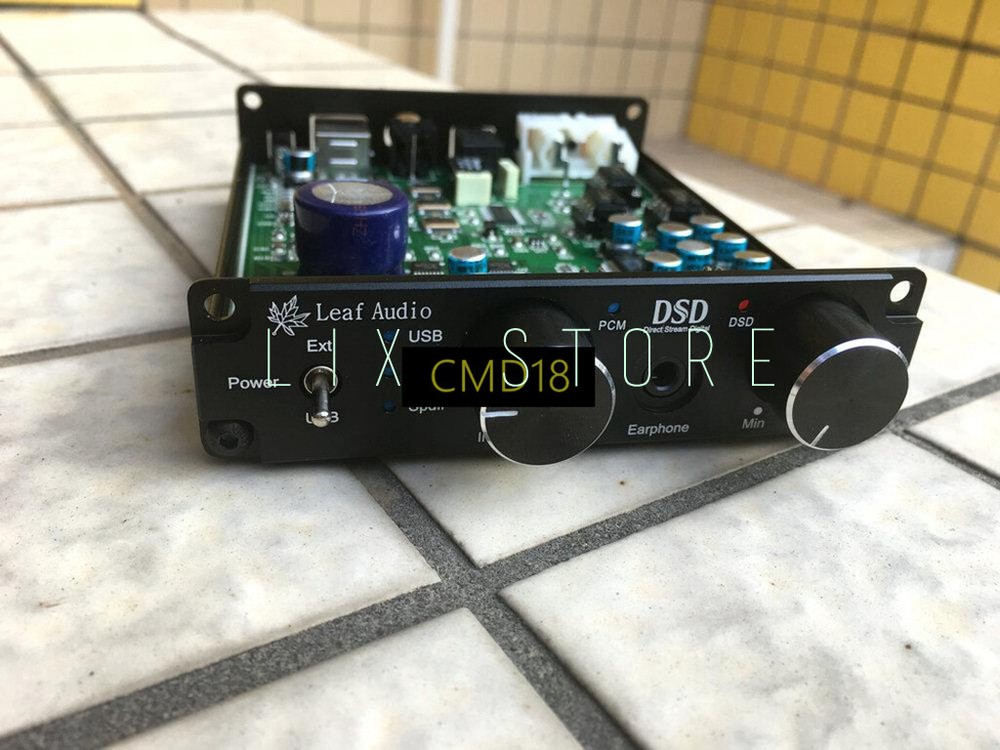
Check the listing for details. XU208 USB DAC decoder headphone amplifier, coaxial, optical fiber integrated/. Condition: New. Listed at 23.00 USD. XU208 USB DAC decoder headphone amplifier, coaxial, optical fiber integrated machine DSD1796 model: Whole machine blackUSB data cable Note: The USB port does not support the insertion of U disk, hard disk, only computer or mobile phone OTG (Note: Some Android phones may not support it, and some need to install Hiby Player to use (You need to purchase a camera kit separately to connect to an iPhone) The functions are described in detail as follows: 1. Due to the XU208 solution, the sound effect is thicker and more durable than the Italian Amanero version 2. Added coaxial and optical fiber input decoding function, which can be connected to TV, DVD, set-top box, etc., convenient for external audio, and can significantly improve the sound effect! 3. The panel switches the input through the switch, there is a corresponding indicator light to show the input status, no longer need to plug in the USB cable to switch, easy to use (switch input by changing the logic level of the receiving IC pin, not a common lossy switch ---The switch directly switches the signal) 4. Reduce the impact sound of DSD and PCM playback conversion (the impact sound is still a bit, but it is much smaller than the Italian Amanero solution) 5. Headphone amplifier with volume control 6. Support DSD native hard-decoding mode when using USB decoding, the details and sound field width are better 7. The DAC chip is DSD1796, which is an American TI company's DSD format special solution chip, which performs better than ordinary PCM chips (most chips are internal transcoding, that is, pseudo DSD decoding that converts DSD to PCM inside the chip) 8. The default matching op amp is 3 JRC4580, op amp with socket, support self replacement (3 op amps are dual op amps) 9. It can be powered by a USB port or an external power supply, which can be connected to a power bank, or other USB ports, such as set-top boxes, USB ports of TV sets, etc., to facilitate power supply (power supply voltage is 5V, current is greater than 0.5A) 10. The USB interface supports OTG Android phones, set-top boxes, etc., Apple computers, Apple phones (camera kit required), linux, delphi systems for direct use without drivers (need external power supply, and first turn the panel switch to USB), Android 5.0 The above mobile phones are automatically supported, and can be used without installing the Haiby player! Dimensions: 110*98*25mm (excluding protruding parts) Weight: 300 grams Power interface: USB port can be used for power supply, or external power supply (note that the voltage must be 5V, cannot exceed, otherwise it will be broken) External power supply specification: DC 5V >0.5A socket specification: DC3.5-1.3mm Coaxial and optical input working current: 60mA USB input working current: 200mA Headphone power: 130mW/32 ohm Audio output distortion: 0.008% Audio output amplitude: 2.1V RMS Coaxial support format: PCM 44.1K-192K/24bit Optical fiber support format: PCM 44.1K-96K/24bit USB decoding support format: PCM 44.1K-384K/32bit, DSD64-DSD256 automatic recognition and decoding (DXD format is not supported) note: 1. When the decoder has only optical input (opt), the optical signal will be decoded regardless of whether the selector switch is in the coaxial or optical position. Once the coaxial cable is plugged in, the input mode will be selected according to the panel to decode. It is not a functional problem, it is the preferred decoding Level question 2. This DAC does not support DXD format decoding 3. If there is a squeaking noise from the external power supply, the 3.5mm power plug is not contacted well, just turn it around 4. When the USB port is connected to the mobile phone, an external power supply is required 5. A product will certainly not be perfect, satisfying anyone, and the sound is very subjective. Some people say that the voice is cold and hard, while others say that the voice is round, delicate and hard to hear. In fact, the key depends on your collocation. If you don't match thousands or tens of thousands of devices, you will feel uncomfortable for yourself, but if you change to another person, you may feel very good and satisfied. Everyone has a different understanding of sound! Some people think that the speakers of the square dancers are all good, what do you say? Among the various sound sources I have heard, this one is a bit thick and durable. -------------------------------------------------- ------------------------- Driver installation and FOOBAR player settings: Connect the USB cable to the computer, install the driver, this is very simple, no need to introduce it Note: When installing FOOBAR, select "Full Installation" FOOBAR player settings: 1. First open the player "File-Parameter Options", click "Components" on the left, and then click "Install" in the lower right corner to install the downloaded ASIO plug-in: foo_out_asio.fb2k-component (First decompress the downloaded plug-in package ), press "OK" and restart FOOBAR, after the installation is complete, as shown below 2. Install the "ASIO Proxy Install-0.7.1.2.EXE file" in the folder "foo_input_sacd-0.7.1" in the plug-in package, as shown below 3. On the "Parameter Options" page of FOOBAR, click "Play" --- "Output" on the left, and select the output device on the right: ASIO:foo_dsd_asio, as shown below. (When WIN10 system uses FOOABR1.3.14, the output device selects "DSD:ASIO:XMOS USB AUDIO 2.0 ST 3004 ASIO 1.03") 4. Click "ASIO" in the "Output" drop-down menu on the left, double-click on the right: foo_dsd_asio, as shown below 5. In the pop-up menu, set and close as shown in the figure below. Then click "Tools" on the left and select "SACD Decoder" from the drop-down menu. In the menu on the right, the first item is "DSD", and the others remain unchanged, and then press "OK" to complete the setting. As shown below: Note that when playing DSD, the system volume should be adjusted to 100, otherwise there will be no sound (if you use this DAC to watch movies, network videos, etc., please set XMOS as the default device) Quantity: 1pcWarranty: 120 days
You may also like


